Professional Laptop RAM Upgrade Services in Las Vegas
From 8GB to 32GB and beyond, our certified technicians deliver fast, affordable laptop memory upgrades for every brand and every build. Visit today and leave with a faster laptop.
Professional Memory Upgrade Service to Fix Laptop Slow Speed
Quick Laptop Repairs upgrades laptop RAM in Las Vegas the same day for HP, Dell, Lenovo, ASUS, MSI, and MacBook-compatible builds from 8GB all the way to 64GB. A standard 8GB to 16GB DDR4 upgrade costs from $49, including installation, and most upgrades are done within one to two hours. Every upgrade starts with a free RAM compatibility check and ends with a full memory stress test.Â
At our shop, we offer same day RAM memory upgrade laptop service in Las Vegas. Whether you need a DDR4 laptop RAM upgrade for an older HP Pavilion, a DDR5 laptop RAM service for a newer ASUS ROG or Dell XPS, or you simply need someone to tell you whether your RAM is soldered or not, our certified technicians handle it all at low prices.
Which Laptops and Gaming PCs Do We Upgrade RAM For?
Our shop is known all around Las Vegas for laptop memory expansion for remote workers, students, and creators who need their setup to keep up with their workload instead of holding them back. We handle laptop memory upgrades for all kinds of users
We also handle Lenovo Legion gaming laptop 32GB RAM upgrade solutions, ASUS ROG gaming laptop memory expansions, and high tech builds used for video editing, 3D rendering, and AutoCAD. Our laptop RAM compatibility check ensures we only install RAM that your specific motherboard can support.
What Performance Problems Does a RAM Upgrade Fix?
One second, your laptop is fine, the next it’s freezing, or throwing low memory warnings. We fix laptop performance upgrade issues related to memory for every type of user.

Maximize Speeds for Editing, Rendering, & AutoCAD
Our best laptop RAM upgrade for video editing service evaluates your specific model and recommends the right configuration. A MacBook Pro with soldered RAM needs a different approach than a Dell Precision 5570 with two open SODIMM slots. We handle both.

Fix Random Reboots and System Stability Errors
Failing or insufficient RAM can cause WHEA errors, random reboots under load, and freezing during startup. We diagnose bad RAM modules, incompatible DDR4 vs DDR5 laptop RAM upgrade compatibility mismatches, and configuration errors from a previous upgrade.

Optimize Your System for Smooth Windows 11
Microsoft recommends 8GB as a minimum, but performance with 8GB is sluggish with background apps, antivirus software, and browser tabs running. Our experts upgrade laptop RAM to run Windows 11 smoothly, test it under load, and confirm everything runs smoothly.
Stop Chrome From Freezing & Crashing Your System
Chrome is one of the highest RAM consumers on any laptop. At 8GB, opening more than six tabs pushes your system into disk swap, which causes the freezing and tab reloading you're experiencing. Upgrading from 8GB to 16GB eliminates this in most cases. We check your current configuration, confirm slot availability, and install the right kit the same day.
Our Quick 4-Step Process for Fast Laptop Hardware Upgrade Service
For a same day laptop memory upgrade service in Las Vegas, a general rule is that an everyday laptop running Chrome and Office works well with 16GB. A gaming laptop RAM upgrade or a custom PC benefits from 32GB. If you are adding more RAM to a laptop for virtual devices, running Docker containers, or using WSL2 for development, 32GB to 64GB is worth considering.
Free Laptop Memory Diagnostics
We identify the current RAM configuration, available slots, and maximum supported memory. We also run a memory test to detect any existing module failures.
Fixed Upgrade Quote
Our technicians evaluate whether your model supports the upgrade, which RAM kit is compatible, and whether a laptop memory upgrade is better than buying a new laptop.
Professional RAM Installation
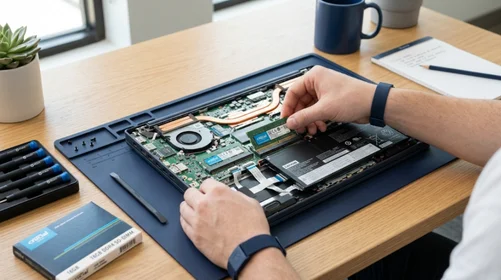
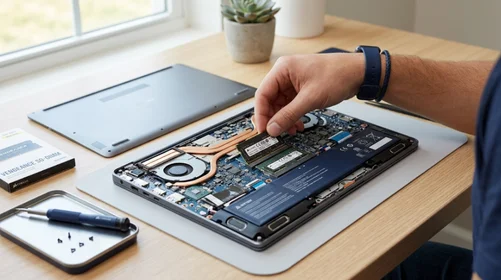
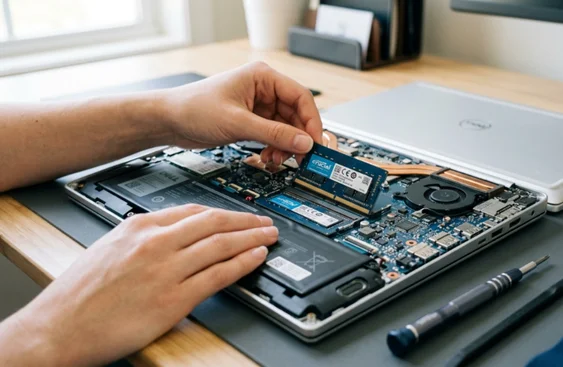
Installing more RAM in a laptop needs ESD-safe handling, correct torque on SODIMM slots, and BIOS verification after installation. We use professional tools and confirm the new memory.
Test Before Return
We run a full memory test, verify speeds in the BIOS, and confirm system stability. Our reliable laptop RAM upgrade service with a warranty means your device is still covered.
Can My Laptop RAM Be Upgraded or Is It Soldered?
- The first thing we check is whether your RAM is soldered to the motherboard or seated in removable SODIMM slots. Many ultrabooks from 2020 onwards have soldered RAM that cannot be upgraded after purchase, including the Microsoft Surface Laptop 4 and 5, most Dell XPS 13 models from 2021 onwards, and all Apple MacBooks with M1, M2, and M3 chips. Most gaming and standard consumer laptops still use removable SODIMM slots. These models are confirmed upgradeable:
- HP Pavilion 15 and HP Envy 15 — up to 32GB DDR4
- Dell Inspiron 15 (3000 and 5000 series) — up to 32GB DDR4
- Lenovo IdeaPad 3 and IdeaPad 5 — up to 16GB or 32GB, depending on generation
- Lenovo Legion 5 and Legion 7 — up to 32GB or 64GB DDR5
- ASUS ROG Strix G15 and G17 — up to 64GB DDR5
- MSI Katana and Raider series — up to 64GB DDR5
- If your model is not listed, bring it in. Our RAM compatibility check is free and takes under five minutes.
Most Searched FAQs for Laptop RAM Upgrade
The laptop RAM upgrade cost depends on the amount of RAM, the type (DDR4 or DDR5), and your specific laptop model. Most 8GB to 16GB upgrades are affordable and completed the same day.
It depends on the model. Many gaming PCs and business laptops like the Dell Inspiron, HP Pavilion, and Lenovo ThinkPad series have upgradeable SODIMM slots. Ultrabooks and Apple MacBooks often have soldered RAM. Bring your laptop in, and we will check it for free.
For most users, upgrading from 8GB to 16GB is the single biggest performance upgrade. It directly fixes lag, Chrome freezing, slow startup, and multitasking issues.Â
Most laptop RAM upgrade jobs are completed within one to two hours. If your model requires disassembly and has a complex bottom panel, it may take slightly longer.Â
Yes. If your laptop's processor and storage are still adequate, a laptop memory upgrade vs buying a new laptop is almost always a better option. A RAM upgrade costs far less than buying a new device. It can extend your laptop's usable life by several years.
Yes, up to a point. Most modern games run best with 16GB of RAM in a dual-channel configuration, two matching sticks rather than one. If you are currently running a single 8GB stick, upgrading to 2×8GB dual channel often improves frame rates more than upgrading to a single 16GB stick, because the memory bandwidth doubles. We configure dual-channel by default whenever your laptop has two SODIMM slots available.
DDR5 is faster and more power-efficient than DDR4, but it only works in laptops designed for it. DDR4 and DDR5 are physically incompatible and use different slots. Most laptops made before 2023 use DDR4. Newer Intel 12th, 13th, and 14th generation platforms, and AMD Ryzen 7000 series laptops, use DDR5. We identify which standard your laptop uses during the free compatibility check before recommending any kit.
Our Other Laptop Repair Services
Lovely Customers
See what our happy customers say about our Laptop Ram service.
Call Now for Expert RAM Memory Upgrade Laptop Service in Las Vegas
Quick Laptop Repairs has been upgrading laptop RAM in Las Vegas for 25+ years. Every memory upgrade we do is verified with a full MemTest86 pass before return. From basic 8GB to 16GB RAM upgrades on a Dell Inspiron to a Lenovo Legion gaming laptop 32GB RAM upgrade, or a full laptop hardware upgrade near me consultation, we are here to help you out. Call now for your free diagnostic.