Get a Professional MacBook Cleaning Service in Las Vegas Today
QuickLaptopRepairs is Las Vegas's most trusted MacBook cleaning service for all Apple laptops. From MacBook fan cleaning service to thermal paste replacement, we fix overheating, loud fans, and sticky keys fast and affordably.
Bring Your MacBook Back to Peak Performance with Las Vegas Expert Cleaning
Dust packed into vents, dried-out thermal paste, and clogged fans quietly destroy your motherboard over months. At QuickLaptopRepairs, our MacBook cleaning service covers every Apple model, every chip generation, and every failure with complete transparency before we touch your device.
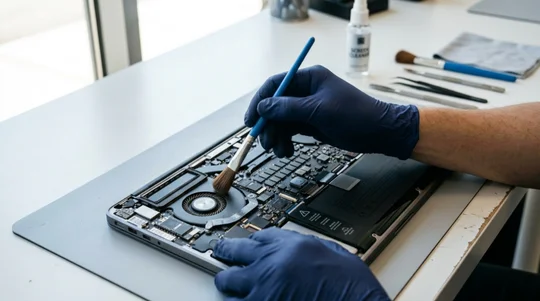
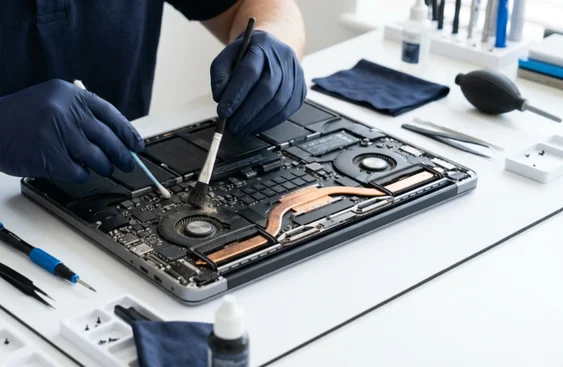
Whether it's a laptop deep cleaning near me service on your MacBook Air M1 that overheats on Zoom calls, or a professional MacBook internal cleaning on your MacBook Pro 16-inch that sounds like a jet engine, our certified Apple technicians handle it all. We don't just blow air through the vents and send you home. We disassemble, clean every component properly, and return your device fully tested and running cooler than it has in years.

Beat the Heat with Our Exclusive MacBook Cleaning Service
Most MacBook users annoyingly complain of MacBook getting hot while charging. Over 12 to 18 months of daily use, dust builds up inside the chassis and blocks the heat pipes. At the same time, the stock thermal compound Applie applies during manufacturing dries out and loses conductivity.
On a MacBook Pro 16-inch with an Intel Core i9 or Apple M3 Max chip, the temperature hits 95°C to 100°C under normal workloads like video editing in Final Cut Pro or running a few Chrome tabs and Slack. On a MacBook Air M1, there's no fan at all. So when the thermal paste dries out, the chip overheats heavily and you get choppy performance during long Zoom calls or large Xcode builds.

Explore Our Full Range of MacBook Cleaning and Maintenance Services
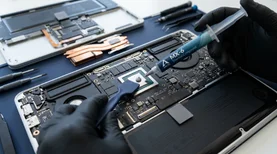
Our professional MacBook internal cleaning and laptop thermal paste replacement directly fixes overheating issues. We use Arctic MX-6 or Thermal Grizzly Kryonaut compound, depending on the chip type, giving you a proper thermal interface that lasts years. At QuickLaptopRepairs, we handle every cleaning and maintenance job Apple laptops need.

MacBook Fan Cleaning Service
The MacBook Pro 13-inch (Intel), MacBook Pro 14-inch (M1 Pro/M3 Pro), and MacBook Pro 16-inch all use dual fan cooling systems. Our MacBook fan cleaning service removes every trace of dust from fan blades, heat pipes, and radiator fins using compressed air and fine brushes under magnification.
Laptop Thermal Paste Replacement
Thermal paste replacement service for MacBook is one of the coolest upgrades you can do on any device older than two years. We disassemble the MacBook completely, clean the old compound off the CPU, GPU, and VRAM chips, and apply fresh high conductivity paste. On a MacBook Pro 15-inch from 2019 with a Core i7-9750H, this drops idle temps by 15°C or more.
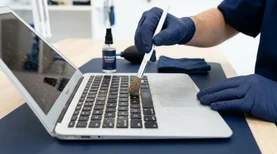
MacBook Keyboard Cleaning Service
Sticky keys on a MacBook Pro are usually caused by crumbs, liquid residue, or dust under the butterfly or scissor-switch keycaps. Our keyboard cleaning service removes each keycap individually, cleans the membrane, and reseats everything properly. We handle sticky MacBook Pro key repair service on the 2016 to 2019 butterfly keyboard models, as well.
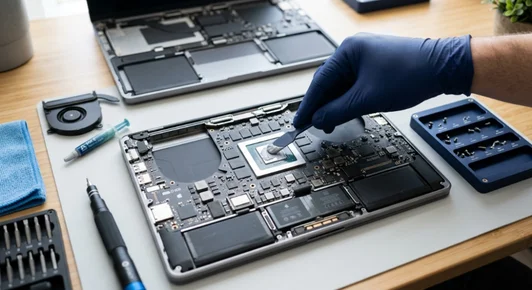
The Only Las Vegas Mac Shop Offering Quality Apple Laptop Cooling Service
Our Apple laptop cooling service goes beyond cleaning. We check thermal overheating using iStatMenus and Intel Power Gadget, verify that fans are spinning at the correct RPM, and confirm the SMC (System Management Controller) is responding to temperature changes correctly.
On MacBook Pros with dual fans, we make sure both are balanced, and there's no physical bearing wear that would cause one fan to fail soon. If you've spilled water, coffee, or juice on your MacBook Air or Pro, bring it in immediately. The longer oxidation sits on the logic board, the more damage it causes. We inspect the board under magnification, clean affected areas, and test all circuits before reassembly.

How We Revive Your Mac with Our Super Fast, Reliable 4 Step Process
A lot of people want to know how to remove dust from MacBook vents without opening. Blowing compressed air into the vents from outside can temporarily dislodge surface dust, but it pushes debris deeper into the fans and heat pipes without removing it.
Free MacBook Diagnostic
We boot your Mac, run temperature monitoring tools like iStatMenus and coconutBattery, check fan RPM via Terminal commands, and check the chassis for dust buildup & thermal overheating.
Transparent MacBook Cleaning Cost Quote
Whether it's a MacBook fan cleaning service, a full professional MacBook internal cleaning, or a laptop thermal paste replacement, you know the price before we start.
Professional Tools and Genuine Parts
We use pentalobe and Torx screwdrivers, ESD-safe mats, precision fan cleaning brushes, compressed air systems, and magnification tools for MacBook logic board dust removal.
Full Test Before Return
After every MacBook cleaning service, we run your Mac under load for 30 minutes, monitor temperatures, confirm fan response, and verify no thermal overheating occurs.
Lovely Customers
See what our happy customers say about our Macbook Overheat Fix Service.
My Macbook had serious water damage, but Quick Laptop Repair fixed it quickly. Great service and fair pricing.

How to Choose Between Apple Store vs Independent MacBook Cleaning
Many customers ask about Apple Store vs independent MacBook cleaning. The Apple Store typically doesn't offer cleaning as a standalone service. If you bring a hot, loud MacBook to the Genius Bar, they'll often quote you a board replacement or a flat-rate repair rather than performing a targeted clean and thermal paste job.
If you want to renew MacBook performance with internal cleaning without paying Apple's depot repair prices or waiting 5 to 7 business days, QuickLaptopRepairs is your answer right here in Las Vegas.

People Also Ask About MacBook Cleaning Service in Las Vegas
The cost of professional MacBook cleaning depends on the model and service needed. A basic fan clean and thermal paste replacement for a MacBook Pro 13-inch typically costs less than a full internal clean on a MacBook Pro 16-inch with dual fans and multiple thermal pads. We give you a free quote before starting anything.
Loud fan noise on a MacBook Pro is almost always caused by dust buildup in the fan blades or a failing fan bearing. Our MacBook fan cleaning service removes all internal dust and tests fan RPM. If a fan is physically failing, we replace it the same day for most models.
The MacBook Air M1 overheating fix usually involves cleaning the internal heatsink and replacing dried thermal paste. Since the M1 Air has no fan, it depends entirely on passive cooling through the aluminum chassis and internal heatsink. Dust blockage and degraded thermal compound both cause system overheating and sluggish performance.
Yes. Cleaning MacBook after liquid spill needs immediate professional help. We disassemble the MacBook, perform ultrasonic or isopropyl alcohol cleaning on the logic board, inspect for corrosion, and test all components. The sooner you bring it in after a spill, the better the results are.
Blowing compressed air into the vents is not the same as safe MacBook internal dust cleaning. External air blowing pushes dust deeper inside. Professional cleaning requires full disassembly, which involves ESD safe tools and knowledge of Apple's specific screw types and cable locking mechanisms. We recommend leaving it to our technicians to avoid accidental damage.

