
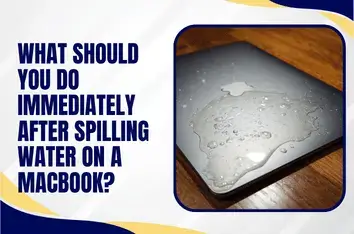
A glass just tipped over. Coffee or water hit the keys a few seconds ago, and your MacBook is sitting in liquid right now. Your hand is frozen above it because you do not know whether to keep using it or shut it down. That shock is real, but the next few minutes matter more than anything else.
If you have spilled water on a MacBook, what you do in the first sixty seconds often decides whether it survives. A liquid spill on a MacBook does not have to mean a dead laptop, but water damage to a MacBook gets worse the longer power and moisture sit together inside.
This guide walks you through the exact emergency shutdown steps, the mistakes that kill MacBooks, the drying myths that waste your time, and the point where professional help becomes the smartest call.
What to Do Immediately If Water Spills on Your MacBook?
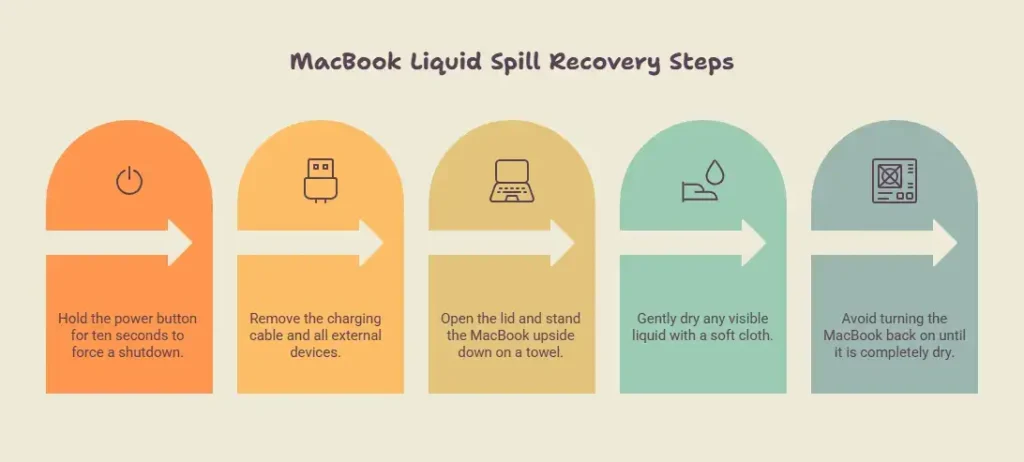
Whenever a liquid spills, the first 60 seconds are the game changer in saving your device. Move fast follow these five steps quickly in order to recover the MacBook.
Power Off the MacBook Right Now, Do Not Wait
Hold the power button down for ten full seconds to force a hard shutdown. Do not use the normal shutdown in the menu. Do not save your work, and do not wait for apps to close. Liquid mixed with electricity destroys the logic board through short circuits and corrosion.
Disconnect the Charger and All Accessories
Pull the charging cable out first, then remove every USB device, headphone set, and external drive. Cut off every source of power reaching the board.
Open It and Turn It Upside Down
Open the lid to roughly 90 degrees and stand the MacBook upside down on a towel so it forms an upside-down V. Gravity pulls the liquid away from the keyboard and the logic board beneath it, rather than letting it pool deeper inside. Do this on a flat, dry surface to keep the laptop stable.
Wipe Off Visible Liquid with a Soft Cloth
Gently dry any liquid you can see on the keyboard, trackpad, and screen using a clean microfiber cloth or paper towel. Wipe only. Do not rub, because rubbing pushes liquid into the seams and spreads it.
Do Not Turn It Back On
People hurry to power the MacBook on to check if it still works. Do not do it. Switching on a wet board causes a short that turns a recoverable spill into a dead logic board.
What NOT to Do After a MacBook Spill: The Mistakes That Cause Permanent Damage

The internet is full of cheap hacks that quietly destroy MacBooks. Each myth below feels helpful, which is exactly why it is dangerous. Here is what to avoid if you accidentally spill a liquid on MacBook.
Do Not Use Rice, It Does Not Work
Rice does not pull moisture out of sealed devices in any way. It cannot reach the internal components where the liquid is. The dust and starch can work their way into ports and cause new problems. Worst of all, it creates a false sense of safety while corrosion is already spreading inside.
Do Not Use a Hair Dryer or Apply Heat
Heat from a hair dryer, a radiator, or an oven can warp internal components and melt the adhesive holding parts together. The hair dryer’s hot air pushes liquid deeper into the laptop instead of evaporating it cleanly. It can even drive moisture into areas the spill had not reached yet. Air drying at room temperature is fine, but forced heat is not.
Do Not Charge It or Turn It On to Test It
Reintroducing power to a board that still has moisture or residue causes a short circuit that kills the logic board, even when the surface looks dry. There is no safe way to test a wet MacBook before it has been properly opened, dried, and cleaned.
Do Not Shake It or Tap It Hard
Vigorous shaking spreads the pooled liquid across the board into areas that were still dry, which turns a small localized spill into a widespread one. Gentle tilting and patience let gravity do the work safely.
What Happens Inside a MacBook After a Spill?
How bad a MacBook water spill is depends on four factors. As if it’s not water, a sugary spill on a MacBook can keep eating components for weeks, which is why professional Mac cleaning is necessary even when the device seems fine.
The Type of Liquid
Sugary, salty, or acidic liquids such as coffee, soda, juice, wine, and saltwater are much worse than water because of the conductive, corrosive residue they leave. That residue keeps damaging components over days and weeks, even after everything appears dry on the surface.
How Much and Where It Landed
A few drops in the corner of the keyboard are very different from a full glass across the center, where liquid drains straight down onto the motherboard. The keyboard, trackpad, battery, and logic board are the components at risk. The logic board is the expensive one, and MacBook logic board liquid damage is what brings expensive repair bills.
Did It Stay Powered On
A MacBook switched off within seconds has a better chance of surviving than one that kept running or stayed plugged in.
Time Before Treatment
Corrosion begins within hours of the spill. The longer the gap between the accident and a proper internal cleaning, the more residue sets and the worse the damage becomes. It gives corrosion time to win.
|
MacBooks contain small internal markers known as Liquid Contact Indicators, or LCIs. They turn from white or silver to red the moment they touch liquid, and Apple uses them to confirm that a spill happened. Due to MacBook’s liquid contact indicator, the standard Apple warranty does not cover liquid damage. |
How Long Should You Let a MacBook Dry Before Turning It On?
Though air drying alone does not remove residue from sugary or dirty spills, how long does it take to dry a MacBook after a spill? Keep the MacBook tented in a dry, well-ventilated room for at least 48 to 72 hours and away from direct heat. Do not seal it in a bag or a container that traps moisture.
Remember, surface drying does not fix internal corrosion, so for anything beyond a tiny plain water splash, professional internal cleaning is the only way to truly know it is safe.
At QuickLaptopRepairs, we recommend bringing in your MacBook for inspection rather than wasting time on drying. Our team opens, dries, and cleans the internals properly because air drying on a desk cannot reach the logic board.
Spilled Water on Your MacBook? Act Now.
The sooner your MacBook is inspected, the better the results, and every hour you wait gives corrosion more room to do permanent damage. Our liquid damage technicians offer a free diagnostic, never start work without your approval, and protect your data at every step. Start your repair today and give your MacBook its best chance.
QuickLaptopRepairs proudly serves customers across the Las Vegas valley, including the Las Vegas Strip, Downtown Las Vegas, Summerlin, Henderson, North Las Vegas, Spring Valley, Enterprise, Paradise, Green Valley, and Sunrise Manor, with fast liquid damage repair available at the best affordable rates.