
Your gaming laptop won’t turn on. The battery drains too fast. The charger randomly disconnects from the port. These power problems are frustrating, turning your gaming session cold.
But before you panic, take a breath. Not every power issue means you need a new laptop. In fact, most gaming laptop power repair problems are fixable. The key is knowing what kind of problem you have. How much it should cost to fix, and when you should go for the replacement options available. This guide breaks it down for you. Simple. Clear. No random guesses.
Why Gaming Laptops Are More Prone to Power Issues?
Gaming laptops work harder than regular laptops. They run hotter, use more power, and use more than max power during long sessions. That extra stress puts more wear on power components over time. Therefore, a gaming laptop or PC fix needs more attention than a normal laptop repair.
Add in things like tripping over the charger cable or plugging in too aggressively, and you have a list of power problems going around your gaming setup. The most common gaming laptop charging issues fall into three categories:
- Dead or dying battery
- Broken or loose charging port (DC jack)
- Faulty power adapter
Each one has a different repair cost. Knowing what the problem is and how to fix it can save you a lot of money.
1. Power Adapter Replacement
This is the cheapest fix and the first thing to check. If your laptop charges fine on another adapter, your original charger is the problem. A replacement gaming laptop charger typically costs $20 to $80, depending on the brand and wattage. Gaming laptops usually require higher wattage adapters, which cost a bit more than standard models.
Always use an OEM or manufacturer-approved adapter. Cheap third-party chargers can damage the battery and even the motherboard. It’s not worth saving $15 to risk a $500+ repair later. Have a quick look at these signs to evaluate if the adapter is the issue.
- Laptop charges fine with a different cable
- Visible fraying or kinking in the cable
- The adapter feels unusually hot
2. Laptop Battery Replacement
Batteries don’t last forever. Most gaming laptop batteries last around 2 to 4 years, or roughly 300 to 500 full charge cycles under regular use. When the battery starts holding less charge than usual or dies completely, replacement is often the right call. The average cost to replace a gaming laptop battery:
- Third-party battery: $50 to $150
- OEM/manufacturer battery: $100 to $200+
- Professional labor (if needed): $20 to $100 additional
For most users, the total cost lands between $80 and $200, depending on the brand, model, and where you get it done. Gaming laptops tend to use larger, high capacity batteries. This pushes the cost toward the higher end compared to standard laptops.
Brands like Razer, ASUS ROG, and Alienware may have proprietary batteries that are harder to find and more expensive to replace.
Authorized service centers often charge the most. Sometimes $150 to $250, including labor. Independent repair shops usually land in the $80 to $150 range, which is often a better option for quality vs cost.
Is it worth replacing the battery?
Yes. If your laptop is less than five years old and the rest of the hardware runs well, a battery replacement makes a lot of sense. It’s almost always cheaper than buying a new PC. However, if the laptop is older than five years or the repair cost exceeds 40% to 50% of what the laptop is worth today, It may be time to think about an upgrade instead.
3. DC Jack / Charging Port Repair
This is where things get a little more complex. The DC jack, also called the charging port or power jack, is the port where you plug your charger into the laptop. It’s one of the most commonly damaged parts on any laptop, gaming models included.
The cable gets yanked, someone trips over the cord, or years of plugging and unplugging wear out the solder joints. Eventually, the port becomes loose. You have to twitch the charger to get it to charge. Or it stops working altogether.
Average DC Jack Repair Cost for Gaming Laptop
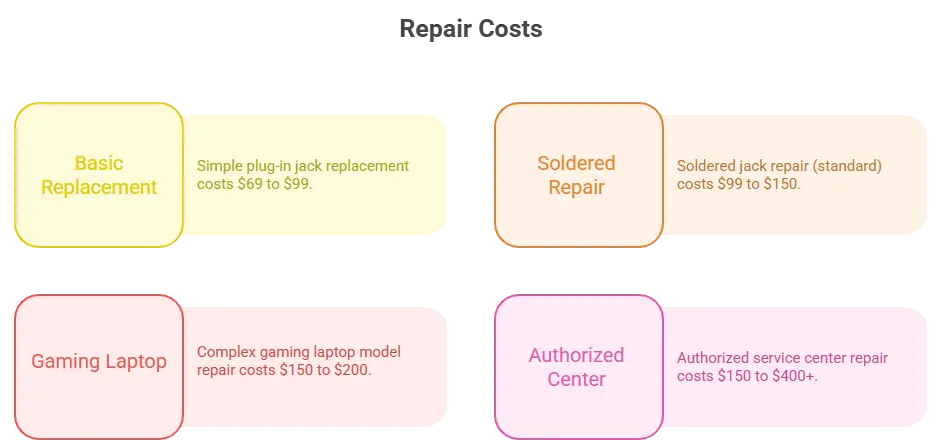
The price variation depends on how the jack is mounted. Some laptops use a cable style jack that simply plugs into the motherboard. These are easier and cheaper to fix. Others have the jack soldered directly onto the motherboard, which needs a skilled technician with a soldering iron and the right tools.
Gaming laptops often fall into the soldered category, which is why repairs can cost more. Don’t let anyone tell you the motherboard needs to be replaced just because the charging port is broken. A reputable repair shop can fix the jack without touching the motherboard. Always get a second opinion before agreeing to a motherboard replacement.
Signs Your DC Jack Needs Instant Fix
- You have to hold the charger at an angle to charge
- The laptop flickers between battery and AC power randomly
- There’s visible damage around the port
- The port feels loose or wobbly
4. Motherboard-Level Power Issues
Sometimes the problem goes deeper than the jack or battery. If the laptop has a fried power circuit, a blown capacitor, or liquid damage affecting the power delivery system, you’re looking at motherboard-level repair.
- Motherboard repair: $150 to $350+
- Full motherboard replacement: $300 to $600+
If a motherboard repair costs $400, and your gaming laptop is worth $700 on the used market, you’re looking at spending more than half its value on a repair. This is the time you should go for the replacement option.
How to Decide b/w Repair vs. Replace?
Here’s a quick rule of thumb that many expert gaming laptop repair shops recommend and follow. If the repair cost is less than 50% of the laptop’s current market value, repair it. For power problems specifically, most fixes fall well within that range. A battery or DC jack repair is almost always the smarter financial move compared to buying a new gaming laptop, which can easily run $800 to $2,000+. Use this checklist to guide your decision:
- Repair if the laptop is under 4 years old and performs well
- Repair if the fix is a battery, DC jack, or adapter replacement
- Repair if the repair cost is under half the laptop’s resale value
- Replace if the laptop is 5+ years old and multiple components are failing
- Replace if the motherboard damage is extensive
- Replace if repair costs approach or exceed the laptop’s value
Where to Get Gaming Laptop Power Repairs Done?
You have a few options when it comes to getting your laptop power jack repair or battery repairs done:
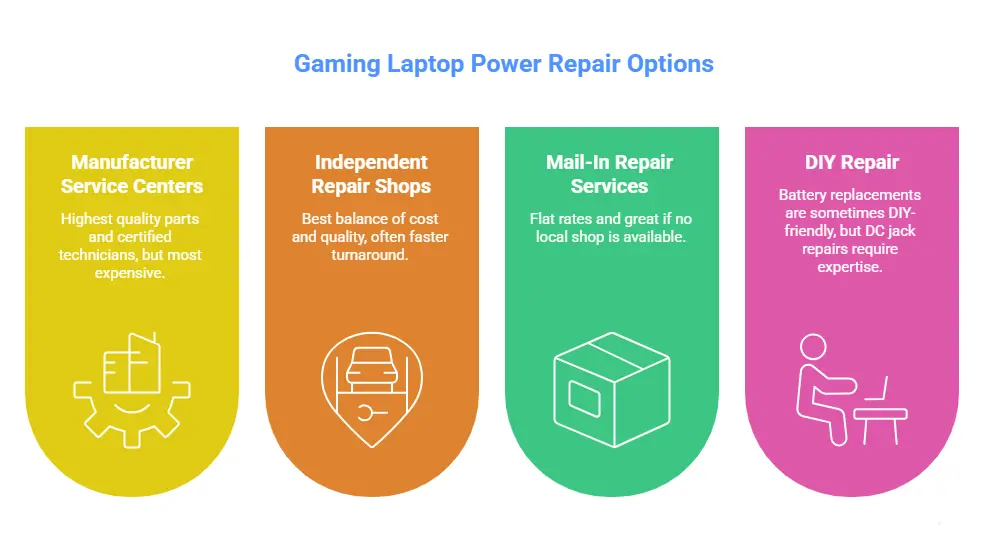
- Manufacturer / Authorized Service Centers
These offer the highest-quality parts and certified technicians. But they’re also the most expensive. Expect to pay a premium and potentially longer turnaround times.
- Independent Repair Shops
Local shops are usually the best balance of cost and quality. Prices are lower, turnaround is often faster, and many specialize in gaming laptop repair. Always check reviews and ask about the warranty on the repair.
- Mail-In Repair Services
Some companies specialize in mail-in laptop DC power jack repair nationally. They often charge flat rates around $99 to $150 all-in, including return shipping and can be a great option if you don’t have a quality local shop nearby.
- DIY Repair
Battery replacements are sometimes DIY-friendly, especially on older models with removable panels. DC jack repairs, however, require soldering skills and specialized tools. If you’re not experienced, leave it to a pro. A bad solder job can damage the motherboard and turn a $100 fix into a $400 problem.
Final Thoughts
Gaming laptop power problems are common, but most of them are fixable without breaking the bank. Whether it’s a dead battery, a worn-out charging port, or a busted DC jack, knowing everything about the repair costs puts you in control.
The biggest mistake people make is assuming a power problem means the laptop is done. It usually isn’t. A $100 to $200 repair can easily extend the life of a machine by another two to three years, and that’s money well spent.
When in doubt, get a free diagnostic from a reputable gaming laptop repair shop before making any decisions. Most good repair technicians will tell you straight if it’s worth fixing or time to move on.