
A cloudy patch near the corner of the screen, hazy blotches along the bottom edge, or smudges that refuse to wipe off no matter how many times you try. If your MacBook screen stains won’t wipe off around the edges or wherever the keyboard presses against the screen when the lid is closed. Your first instinct is probably to scrub harder. Don’t.
Behind a stained MacBook screen is a deteriorating MacBook screen coating, specifically, the anti-reflective layer applied to the glass. Once that coating starts breaking down, no cloth will fix it, because the damage isn’t on the surface; it is the surface.
This guide explains what causes those stains, what you can safely try yourself, what a professional can do short of a full replacement, and when a new display is the only available choice.
What Causes Stains on a MacBook Screen?
Most people assume the marks are dirt. But if wiping does not fix anything, the screen is almost certainly trying to tell you something different.
Anti-Reflective Coating Wear
MacBooks ship with a thin MacBook anti-reflective coating bonded to the front glass. This layer is designed to cut glare and make text easier to read. Over time, that coating can degrade.
Abrasive cleaning, harsh chemicals, oils from the keyboard keys pressing against the screen when closed, or just heavy daily use can all accelerate the process. As the coating peels or erodes unevenly, it leaves cloudy, blotchy, stained-looking patches called MacBook Staingate.
Other Causes Worth Ruling Out
Actual surface grime, like fingerprints, dust, or residue from a dirty cloth, does wipe off cleanly. If a gentle wipe removes the marks, you’re done. Liquid that has seeped between display layers creates a different-looking stain.
These stains are irregular, sometimes shifting, and often accompanied by other symptoms. A failing panel can also produce discoloration, but that tends to come with other signs like dead pixels or flickering.
How to Safely Clean a Stained MacBook Screen Yourself?
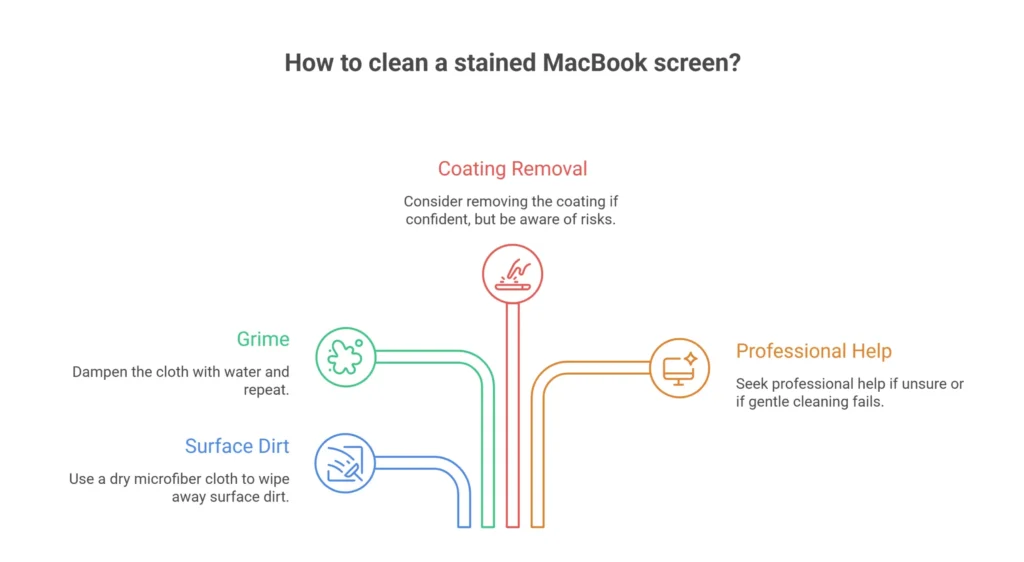
In many cases, a stained MacBook screen can be fixed without replacing the whole display, as long as the panel underneath is healthy and the problem is the coating.
First, Rule Out Surface Dirt
Power the MacBook off completely. Take a clean, dry microfiber cloth and gently wipe the affected area using light, circular strokes. If the marks lifted, it was surface dirt. If they don’t budge, dampen the cloth very lightly with plain water and repeat. Marks that disappear with water are grime.
Use Only Safe Cleaning Materials
Never use paper towels, household glass cleaner, ammonia-based sprays, or alcohol-heavy solutions on a MacBook screen. They can damage and strip the anti-reflective coating. Only a soft microfiber cloth with water, or a cleaner explicitly rated safe for laptop screens, should ever touch the display.
The Coating Removal Approach
Some Mac owners complaining of MacBook screen coating peeling choose to remove the remaining damaged coating themselves to achieve an even, reflective screen. It’s a delicate, completely irreversible process. Any step gone wrong, it scratches the underlying glass and turns a cosmetic issue into permanent damage.
Know When to Stop
If gentle cleaning hasn’t fixed the marks and you’re not confident about touching the coating, stop there. Increasing the cleaning pressure or trying aggressive solvents won’t help and makes things considerably worse. A professional diagnostic at this point is both cheaper and safer than an accidental scratch across your screen glass.
Professional Fixes That Avoid a Full Display Replacement
A technician offering MacBook anti-glare coating repair or MacBook coating removal service can strip the worn anti-reflective layer evenly and cleanly, eliminating the blotchy, stained appearance. The screen will be slightly more reflective afterward. The screen will look clear and consistent, not cloudy or patchy.
Why is Professional Repair Safer Than DIY Here
Removing coating from glass without scratching it requires the right abrasion level, the right products, and a controlled technique. A professional brings all three, which is why paying for the service is a genuinely good option even for something that might superficially sound like a DIY job.
When the Panel Itself Is Fine
Coating damage is a surface issue on the glass. It has nothing to do with the display panel itself. If your screen powers on correctly, shows accurate colors, and has no dead pixels, lines, or flickering, the panel is almost certainly intact.
When Is A Full Display Replacement the Only Fix?
If your staining or discoloration appears alongside dead pixels, lines running across the display, flickering, dark patches unrelated to screen brightness, or backlight failure, the panel itself is likely deteriorating, and no coating fix will handle that.
Liquid trapped between the display layers and cracked or physically damaged glass also requires full replacement. If the panel itself is failing or the glass is damaged, replacement is the answer. But you shouldn’t assume that until it’s been checked, because coating issues cost far less to fix.
Get Your MacBook Screen Diagnosed by Quick Laptop Repairs
At Quick Laptop Repairs, our technicians evaluate the screen to determine exactly what you’re dealing with: surface dirt, worn coating that is often fixable without MacBook screen replacement. Or a panel that needs quick replacement.
Coating damage and panel failure look similar to the naked eye, but cost very differently to fix. A diagnostic tells you which one you’ve got. If it’s coating wear, our technicians can professionally remove or restore the anti-reflective layer without touching the panel. If the panel needs replacing, we’ll tell you and give you an honest quote for a full MacBook repair service.